Car Wash Tracking Software: Full Tracking from Check-In to Handover
It's Saturday afternoon: four cars are covered in foam, three are in the queue and one is waiting to be picked up. The phone rings: "How's my car coming along?" To find the answer, you check the whiteboard, then ask the washer, and finally dig through the receipt book. Car wash tracking software exists to get rid of exactly that moment: you see which vehicle is waiting, which one is finished, who is working in which wash bay and what's in the till at the end of the day, all on one screen.
In this article we walk step by step through what tracking software should record at a car wash, from check-in to handover. Our examples use Cleandy car wash software, but you can use the list as a checklist whichever program you're evaluating.
What Should Car Wash Tracking Software Track?
As a business grows, information kept in people's heads quickly falls apart. A good tracking system should be able to answer at least these seven questions instantly:
- Vehicle: Which plate, which vehicle type, has it been here before?
- Customer: Who owns the vehicle, what's their phone number, do they have a balance or a package?
- Service: Exterior wash, interior cleaning, or polishing and waxing?
- Location: Which wash bay is the vehicle in, and at what time?
- Staff: Who took on the job?
- Status: Is it waiting, in progress or ready for pickup?
- Payment: Cash, card, or charged to an account?
If each of these seven pieces of information sits on a different piece of paper, you're not tracking anything; you're just taking notes.
1. Vehicle Check-In: Tracking Starts with the Plate
At a car wash, the fastest way to recognize a customer is by the license plate. In Cleandy, when you type the plate into the plate field on the order screen and search, the registered vehicle and its owner are found and the customer is selected automatically. If you don't want to bother typing at rush hour, you can scan the plate with a phone or tablet camera: you fit the plate inside the on-screen frame, then check and confirm the plate that was read. The image is processed on the device and is not sent anywhere; if a plate can't be read, you type it in by hand.
If a plate is mistyped by one letter, the program suggests registered plates that differ by one character with a "Did you mean?" prompt. An unregistered plate can be added to the customer you've selected with a single tap. Because you can assign more than one vehicle to a customer, family cars and company vehicles are kept together on the same card.
Next, you choose one of more than 12 vehicle types (Sedan/Hatchback, SUV/Crossover, Minibus/Van, Pickup/Light Truck, Motorcycle, Luxury/Sports and others) and the services to be done; prices come from that vehicle type's price list. On Professional and higher plans, you can also attach a photo of the vehicle to the receipt at check-in, so you have a record when the "this scratch happened here" argument starts.
2. Wash Bays and Staff: Who Is Doing What, and Where?
If you have more than one wash bay, this is where the real confusion begins. On Cleandy's Car Wash screen, each wash bay is its own column in the calendar; you give it a name such as "Bay 1" or "Bay 2" and a color. Each card shows the plate, the vehicle type and the staff member doing the job, so you can tell at a glance which vehicle is in which bay.
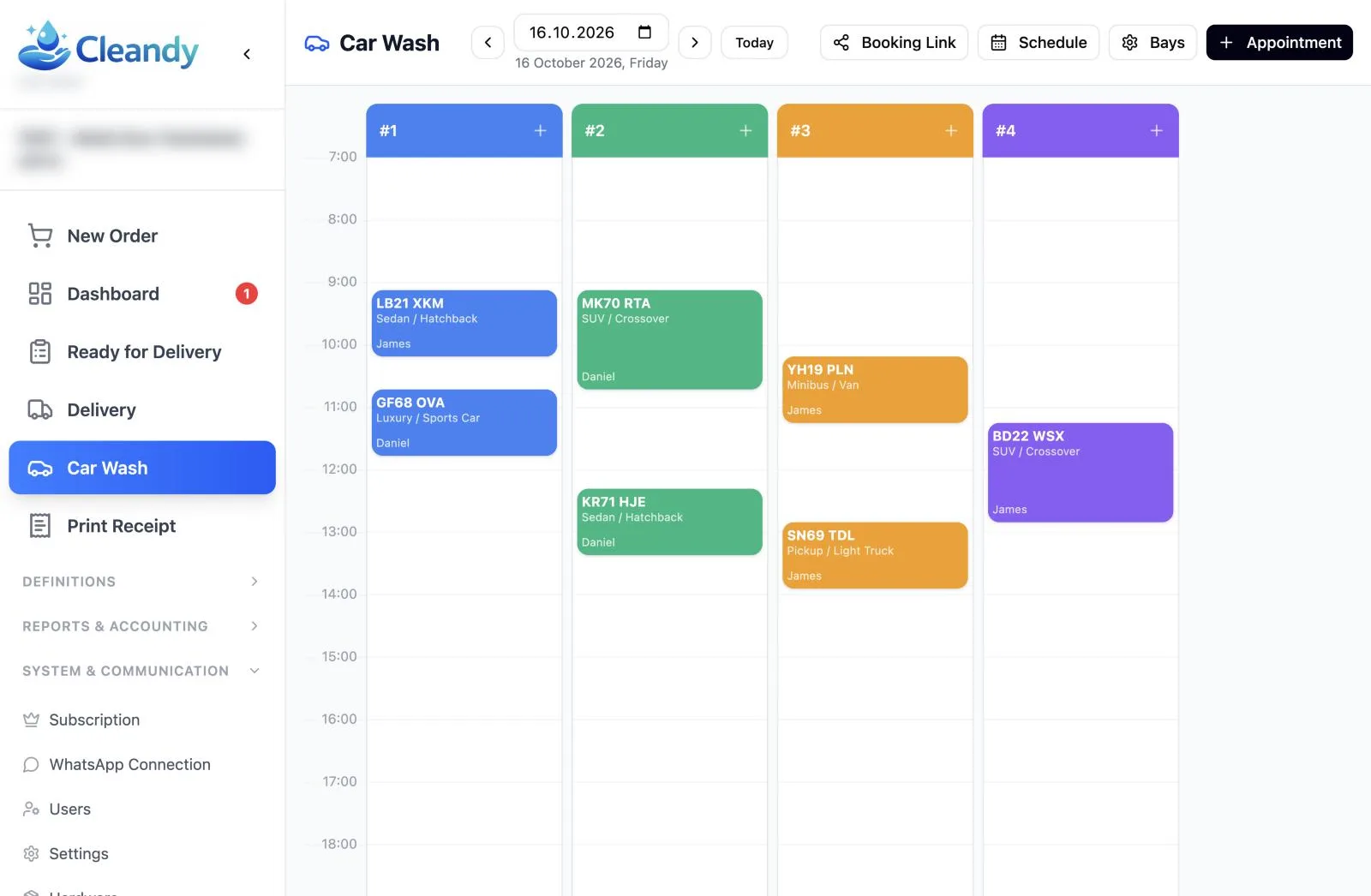
Every record has a status: Pending, In Progress, Completed or Cancelled. Below the calendar you'll find the day's count for each status and the total number of records, so the answer to "how many cars are waiting?" comes without counting.
On the staff side, two rules make your life easier:
- Employees see only their own work. A user with the employee role sees only the vehicles assigned to them, so the list doesn't get cluttered.
- No job is left without an owner. Records with no staff member assigned wait in the "Unassigned Jobs Pool". A free employee takes the job with "Claim", or a manager hands it out with "Assign Staff".
If you work by appointment, customers can also drop their own bookings into this calendar via a link; we cover the details in our car wash appointment system article.
3. Waiting and Finished Vehicles: The Delivery List
The calendar shows the plan; the delivery list shows what's really happening at the counter. On the "Ready for Delivery" screen, you filter open receipts as Pending or Ready and search by receipt number, customer name or phone number.
When a vehicle is finished, you just press the "Ready" button. If you've set up a WhatsApp message template and the customer hasn't turned off WhatsApp notifications, a ready message goes to the customer. With the "WA Remind" button on the same screen, you can resend a "Your order is ready" message with the receipt number and line items whenever you like. That way you don't have to call customers one by one to say "your car is ready". When the vehicle is handed back to its owner, the handover is recorded on the Delivery screen; if payment is due on pickup, it's collected there.
4. Daily Cash: One Report at the End of the Day
The last link in the tracking chain is money. In Cleandy, you take payments in cash, by credit card, on account or as payment on delivery. At the end of the day, the Z Report brings the following together on one page:
- Total number of orders and revenue
- Breakdown by payment method (cash, card, on account, bank transfer and others)
- Expenses during the day
- Cancelled receipts and the reasons for cancellation
- Cash count: opening float and cash to be handed over
You can run the report for a single day or a date range and export it to Excel. Cash is also tracked per staff member: you can see separately who collected how much and what needs to be handed over by whom at the end of the day. In the receipt list, the name of the cashier who processed each receipt is shown next to it. Users with the cashier role, however, cannot access the Z report or the receipt list; the end-of-day figures are followed by you and the people you authorize.
5. Customer History: Don't Start from Scratch on the Second Visit
The long-term value of tracking software builds up on the customer card. In Cleandy, the customer card holds the registered plates, past receipts, payments and the current balance; if you've sold a monthly subscription or wash package, the remaining washes are here too. You can send fleet or corporate customers who work on credit an account statement for the date range you choose via WhatsApp.
If you want to keep regular customers coming back with packages, take a look at our car wash subscription and package system article.
Notebook vs. Tracking Software
| Topic | Notebook / whiteboard | Car wash tracking software |
|---|---|---|
| Finding the customer | Flipping pages by name | Typing the plate or scanning it with the camera |
| Which vehicle is in which bay | Looking at the board, asking around | Calendar by wash bay |
| Who's doing the job | In someone's head | Staff name on every record |
| Waiting and ready vehicles | Checking one by one | Pending / Ready filter |
| Letting the customer know | Phone call | WhatsApp ready message |
| End-of-day cash | Adding up by hand | Z report by payment method |
| Customer history | In old notebooks | Receipts, payments and balance on the customer card |
Frequently Asked Questions
Can car wash tracking software be used on a phone?
Yes. Cleandy runs in the browser; you log in from a phone, tablet or computer without installing anything. Plate scanning uses the phone or tablet camera.
Can staff see other employees' jobs?
A user with the employee role sees only the records assigned to them in the calendar. Unassigned jobs sit in a shared pool, and employees can claim them.
Is the customer notified when the vehicle is ready?
When you mark the vehicle as "Ready" in the delivery list, a WhatsApp message goes to the customer if a WhatsApp message template is set up and the customer's notifications are on. You can also send the message manually with "WA Remind".
What happens if a plate is mistyped?
The program shows registered plates that differ by one character as suggestions. When you pick the correct plate, the customer card opens; if the plate isn't registered at all, you add it to the customer you've selected.
Try It Free for 15 Days
To see the tracking screens with your own vehicles, explore Cleandy car wash software and open your 15-day free trial account; no credit card required.