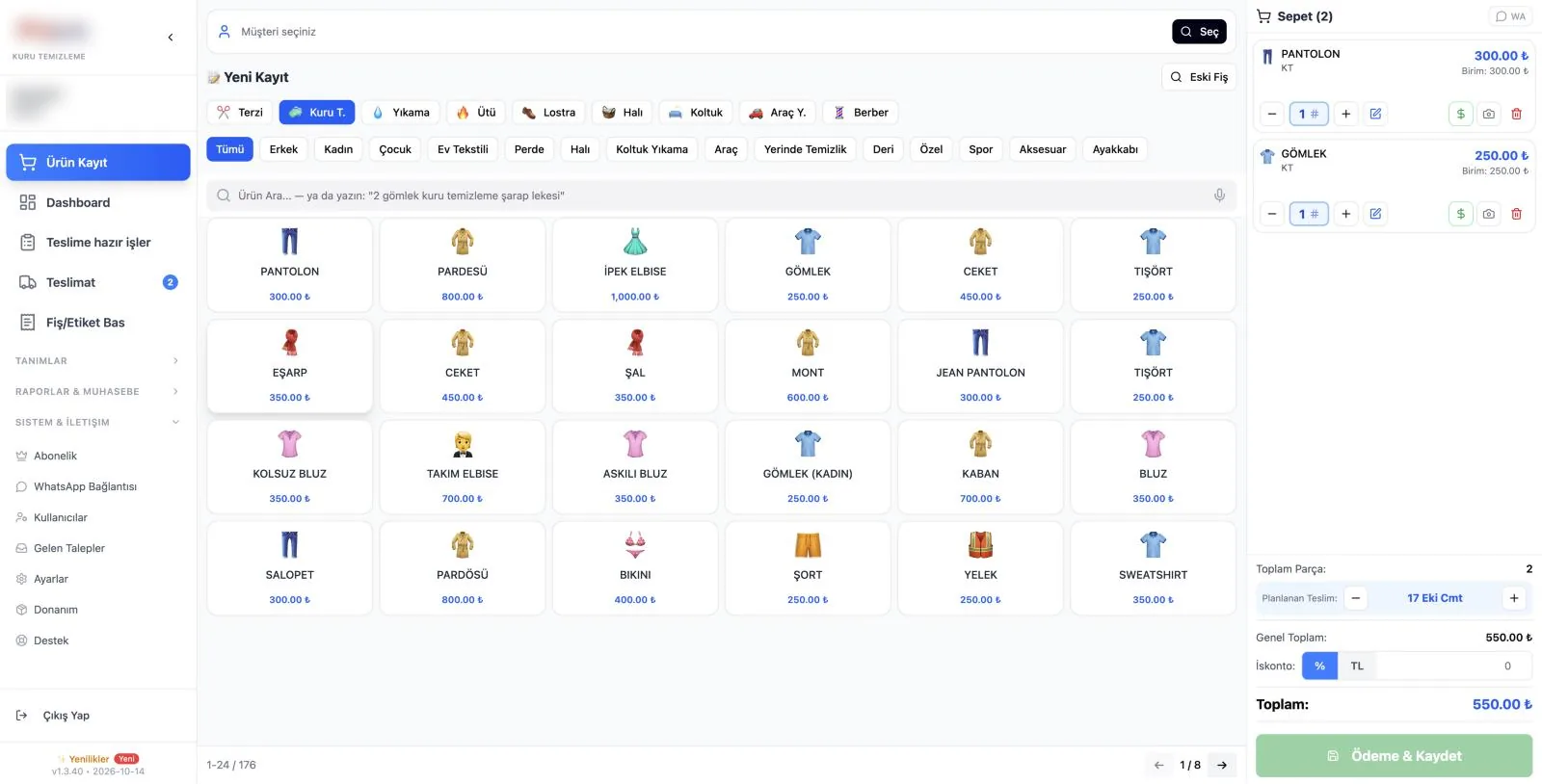
Most dry cleaners start out with three tools: a pad of numbered paper tickets, a notebook for customers who pay on account and an Excel file. This setup works; otherwise it would not be so common. The question is: at what point does it start costing you money and customers? Below we compare paper, Excel and dry cleaning software on the same everyday jobs.
What do paper tickets and a notebook do well?
A paper ticket is fast, the customer walks away with something in hand and the system never crashes. In a shop taking in fifteen or twenty garments a day, nothing gets lost.
The trouble starts as volume grows. The ticket pad is numbered but not searchable: when a customer loses his ticket or says "the winter coat I dropped off last month," you flip through the stubs page by page.
Comparison table
| Job | Paper ticket + notebook | Excel | Dry cleaning software |
|---|---|---|---|
| Logging an order | Written by hand | Typed by hand | Pick items and services; price comes from the list |
| Finding a customer | Flip through stubs | Ctrl+F | By name or phone in seconds |
| Stain and damage notes | In the ticket margin | Separate column | Written on the item's line |
| Receipt for the customer | Paper stub | None | Receipt on WhatsApp |
| On-account balances | Tab notebook | Formulas | Balance on the customer card; account statement on WhatsApp |
| "Is it ready?" calls | You check | You check | Customer checks with phone and ticket number |
| End-of-day cash-up | Added by hand | Formulas | End-of-day (Z) report |
| Pickup and delivery | Driver writes on paper | None | Driver enters it in the app on his phone |
| Cost | Ticket pads and notebook | Free | Free plan available; paid plans from $25/month |
Excel's real problem: it is for one person
Excel beats paper: you can search it, total it and back it up. But Excel is a one-person tool. While the counter clerk is entering an order, you cannot open the same file; the driver on the road cannot reach it; the customer sees nothing.
With software, an order opened at the counter shows up on the owner's screen at the same moment. When the driver opens an order at the door with Cleandy Mobil, it lands on the screen in the office.
On account: from notebook to account statement
If you have hotels, property managers or customers who settle at month end, you know what a burden the tab notebook is. The customer calls and asks "how much do I owe?"; you open the notebook and add it up.
In the software every receipt and every payment is posted to the customer's card. You pick a date range and send the account statement to the customer's WhatsApp in one tap: the receipts and payments for the period, total debit and credit, and the closing balance in a single message.
The "is it ready?" call
The job that eats the most time in a day is often not pressing but the phone. The customer calls, you go and check the rail.
In Cleandy the customer types his phone number and ticket number into the order tracking page and sees for himself whether his item has been received, is in process or is ready. You can add a link to this page on your website, your Instagram profile or your Google Business Profile.
Is switching from Excel hard?
This is the part people dread most: the customer list built up over years. In Cleandy you can import your customer list from Excel; you do not have to retype old records. The item and price list comes ready for your sector, and you swap in your own prices.
Which one is right for you?
- 15–20 garments a day, no on-account customers, one person: paper tickets are enough.
- You have customers on account: the customer account and statement alone justify switching.
- More than one employee or a driver: Excel jams because it cannot be shared.
- "Is it ready?" calls keep interrupting you: WhatsApp receipts and the order tracking page lighten the load.
You can try it without card details: on the dry cleaning software page every feature is free for 15 days; after that, if you do not choose a paid plan, your account continues on the Free plan.
Frequently Asked Questions
Is Excel enough for a dry cleaner?
It is enough for a small shop run by one person with no on-account customers. Once there is more than one employee, a driver or customers who pay at month end, Excel falls short because it cannot be shared and cannot give the customer any information.
Is there free dry cleaning software?
Cleandy has a Free plan with no time limit: 100 receipts a month, up to 250 customers, 1 user and 5 free WhatsApp messages a day. Every new account first gets 15 days with all features free.
What can I use instead of a customer tab notebook?
The customer account on the customer card: every receipt and payment is posted automatically, the balance is visible at any time and the account statement goes to the customer's WhatsApp in one tap.
Can I import my customer list from Excel?
Yes. You can import your customer list from an Excel file into Cleandy; you do not have to re-enter records one by one.
How does the customer find out the order is ready?
He gets the receipt on WhatsApp, and he can also check the status himself by entering his phone number and ticket number on the order tracking page.