For dry cleaning, carpet cleaning and upholstery cleaning businesses that offer pickup and delivery, the weakest link in record-keeping is the road. The driver picks up the items and writes them on paper; in the evening he gets back to the shop and the paper is typed into the software. That is where lost notes, wrongly written prices and the "who collected the money?" question come from.
Cleandy Mobil closes that gap: the driver opens the order at the customer's door, enters payment on delivery, and every step shows up on the web panel instantly. The app is available on the App Store and on Google Play.
Paper vs the app
| Job | Driver writes on paper | Cleandy Mobil |
|---|---|---|
| When does the order enter the system? | In the evening, back at the shop | At the door, right then |
| Who writes the price? | The driver, from memory | It comes from the company price list |
| Customer discount | Can be forgotten | The discount on the customer card is applied automatically |
| Rug size (m²) | On paper, calculated later | Entered on the measurement screen, amount calculated |
| Who took the payment? | Asked in the evening | Recorded under the delivering driver's name |
| What does the office see? | Nothing until evening | Order and payment instantly |
What can it do?
The day's work in four tabs
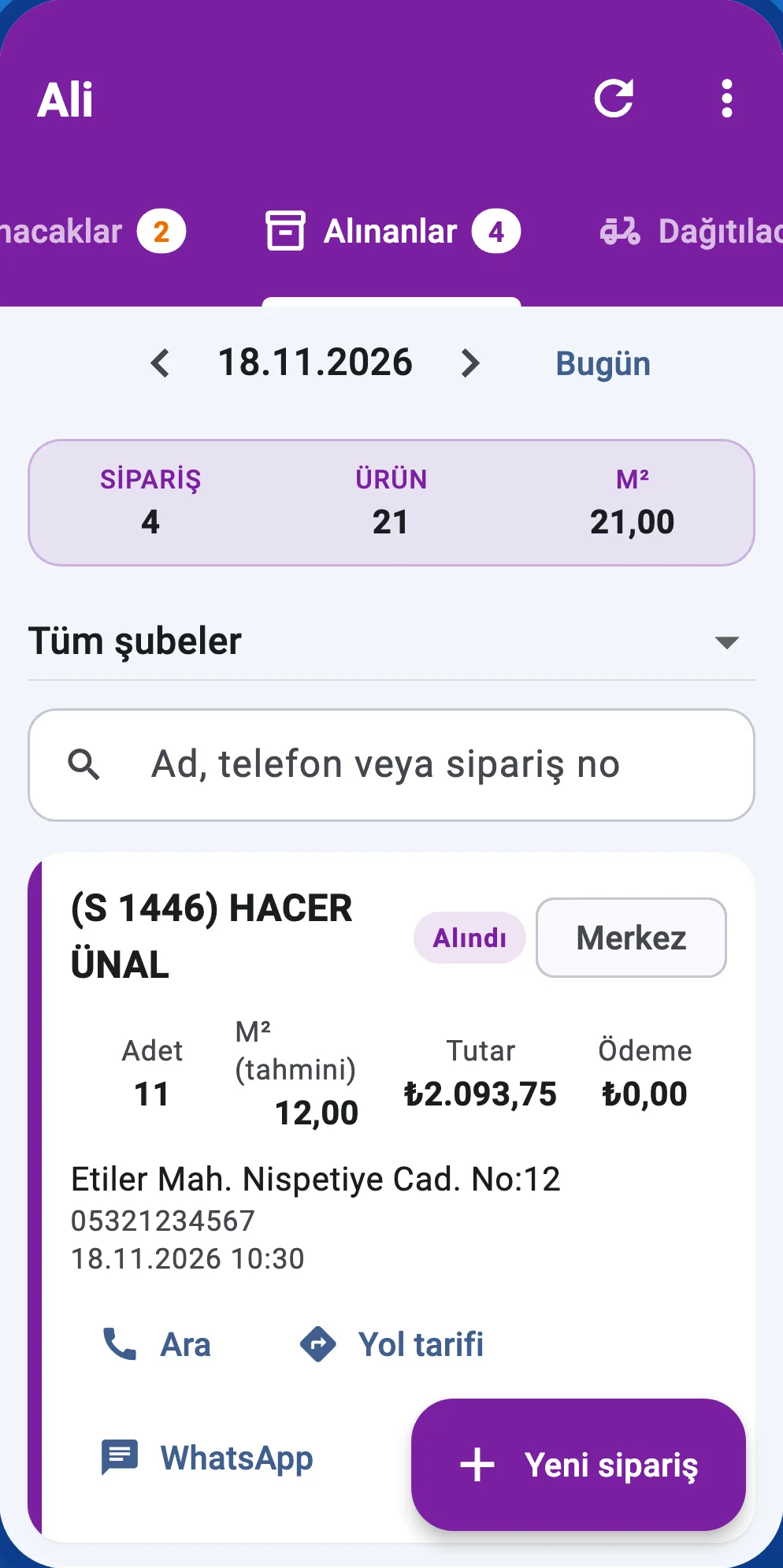
Orders are grouped by status: to pick up, picked up, to deliver, delivered. Each tab shows its order count; the day's totals for orders, items and square metres sit at the top of the list.
Mixed orders on one receipt
Whatever the customer hands over goes on the same receipt: a suit and shirts for dry cleaning, shirts for pressing, three rugs. Services follow your company's sector. Notes such as "collar stain" are written on the item's line.
Price list and discounts
Items and prices come from your price list in the web panel; the driver does not type prices. If a discount is set on the customer card it is applied automatically; subtotal, discount and total appear instantly.
Rug measurement
At the door the driver enters the number of rugs and, optionally, an estimated area in square metres. After cleaning, each rug's type and square metres are entered; the amount is calculated with your company's prices. The other items on the same receipt are kept and the total is recalculated.
Delivery and payment
On delivery the amount due appears on screen and is collected in cash or by card. The payment is recorded under the delivering driver's name and updated on the web panel instantly.
Reach the customer with one tap
From the order card the driver can call the customer, get directions to the address or send a WhatsApp message.
What can the driver not do?
The app is signed into with a company code, a username and a PIN. Users with the driver role cannot delete orders, cancel them or change prices; permissions are managed from the web panel.
Which plan includes it?
Cleandy Mobil is included in the Professional and Enterprise plans. The Free and Starter plans do not include the mobile app. Plan prices are in the pricing table on each sector page: dry cleaning software, carpet cleaning software, upholstery cleaning software.
How to get started
- Your driver downloads the app from the App Store or Google Play.
- He signs in with the company code, username and PIN.
- Orders he opens in the field land on the web panel.
If you do not have a Cleandy account yet, you can start free from the home page.
Frequently Asked Questions
Which phones does Cleandy Mobil work on?
It works on iPhone (iOS 15 or later) and on Android phones. The app is available on the App Store and Google Play.
Is Cleandy Mobil free?
Downloading the app is free; to use it, your company needs a Cleandy account on the Professional or Enterprise plan. The Free and Starter plans do not include the mobile app.
Can the driver change prices?
No. Prices come from the price list in the web panel. Users with the driver role cannot change prices, delete orders or cancel them.
When does an order opened in the field show up in the office?
Instantly. An order opened in the field appears on the office panel, and an order opened in the office appears on the driver's phone.
Which businesses is the app for?
It is built for dry cleaning, carpet cleaning and upholstery cleaning businesses that offer pickup and delivery, and for cleaning businesses that collect and deliver with their own vehicles.