Graphic Reports: Keep Your Finger on the Pulse of Your Business with Cleandy
Managing a business properly requires seeing the story behind the numbers. Cleandy's Graphic Reports section presents your business performance with charts instead of number tables — they are faster to read and instantly reveal trends.
Graphic Reports Screen
The main reporting panel brings several critical indicators together:
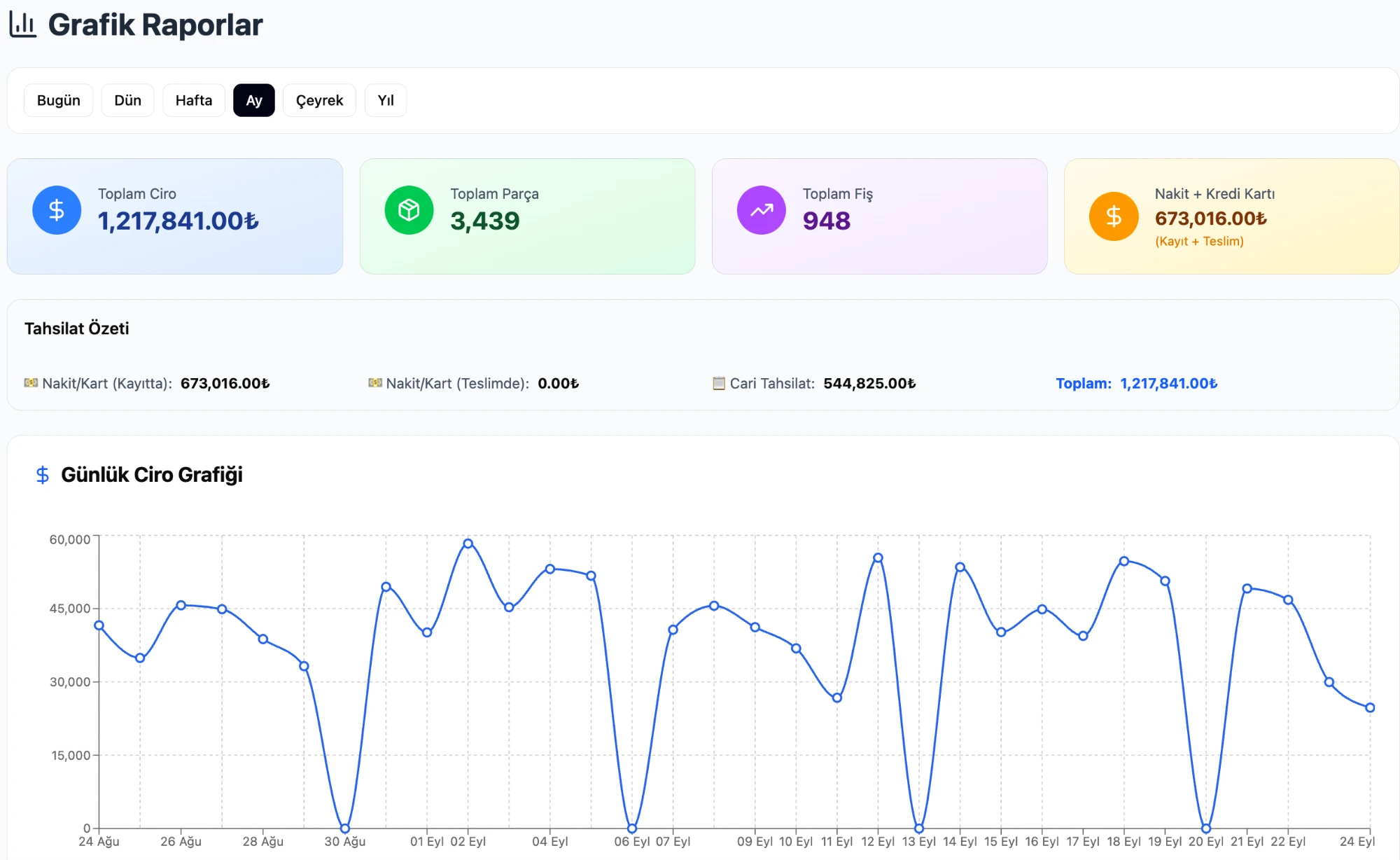
The screen displays:
- Total Revenue — Sum of all receipts in the selected period
- Total Items — Number of products and items processed
- Total Receipts — Number of receipts issued
- Daily Revenue Chart — Revenue for each day in the selected date range, shown as a bar chart
The date range is adjustable; comparisons can be made on a daily, weekly, or monthly basis.
Top 10 Customers by Revenue
Knowing your regular customers is critical for business strategy. Cleandy's customer revenue report shows the top 10 most valuable customers in both chart and table format:
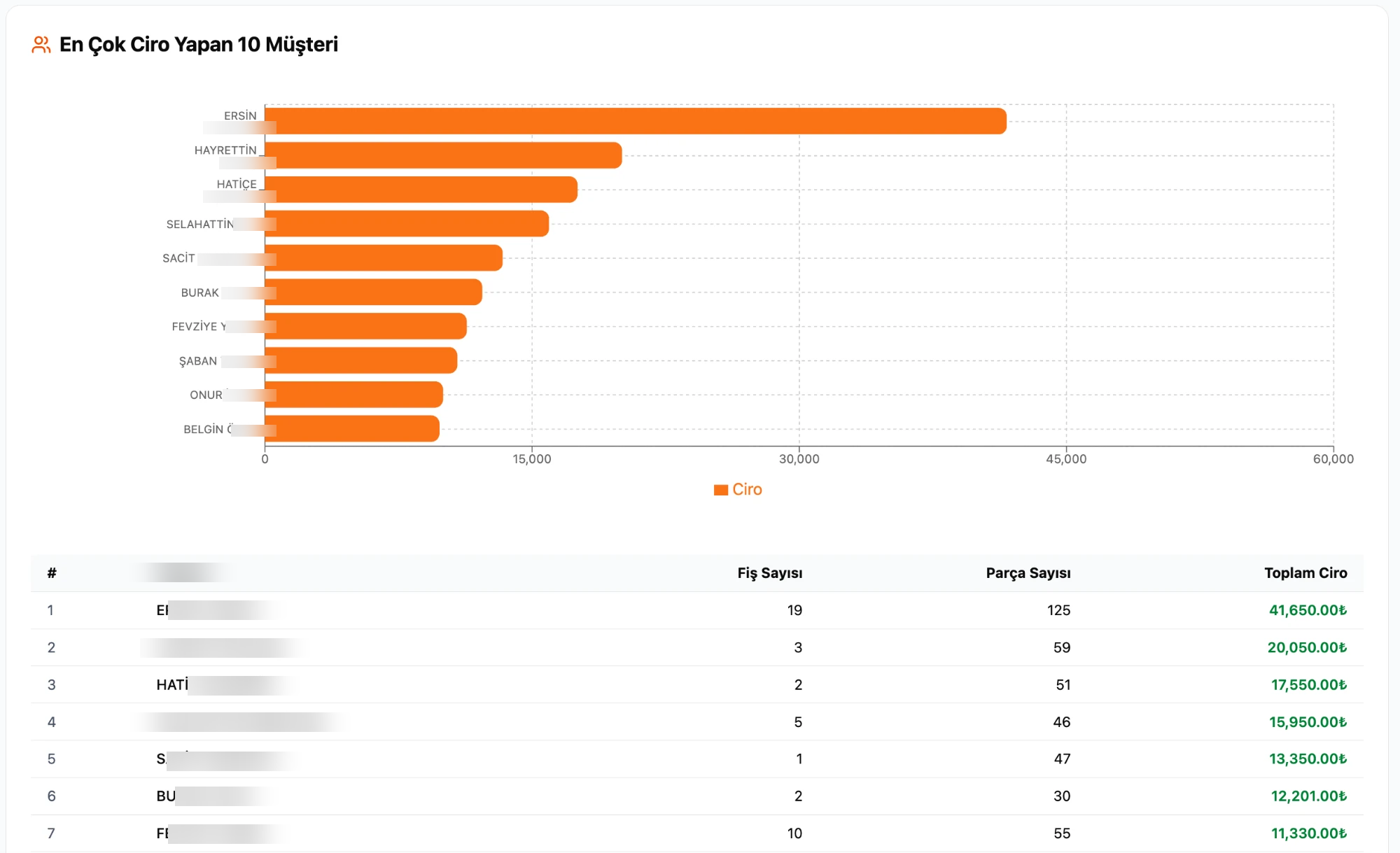
From the table you can read each customer's:
- Total number of receipts
- Total item count
- Total revenue amount
This allows you to easily distinguish the "most frequent visitor" from the "biggest spender." This report is the primary reference point for VIP customer notifications or periodic discounts.
Daily Item Count Chart
Tracking the item count trend is important for planning your workload:
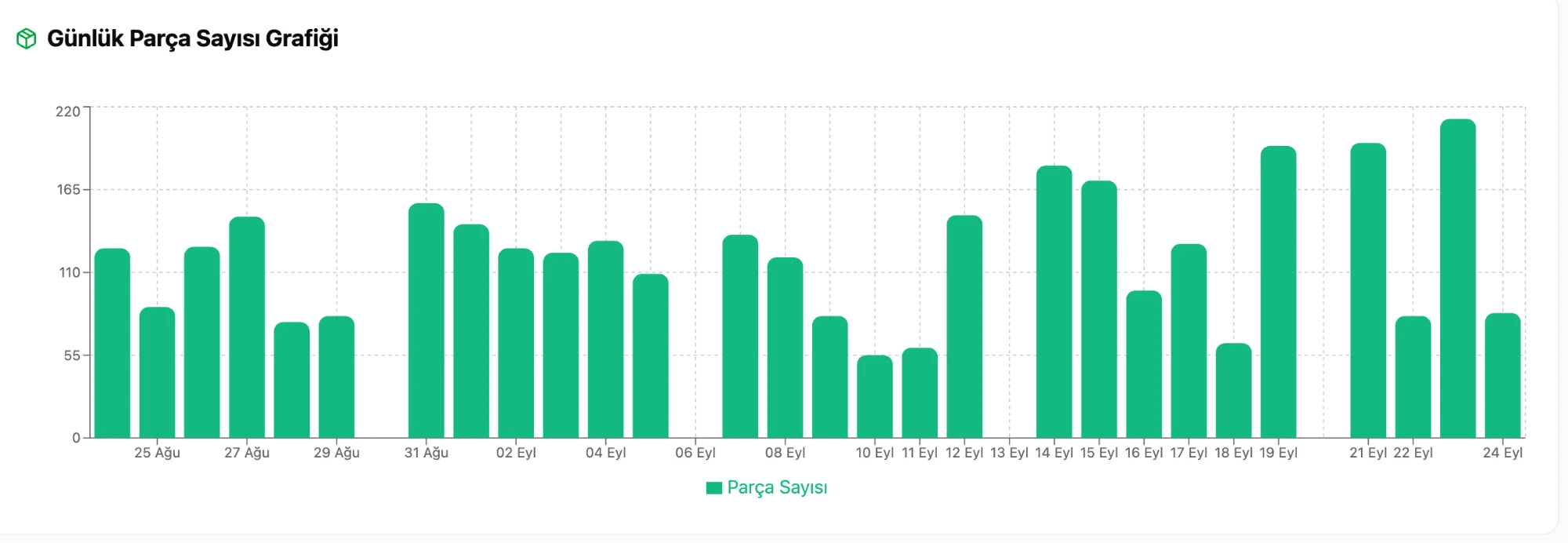
This chart answers these questions:
- Which days of the week are busier?
- Is the item count increasing during certain periods?
- Where are the peak points for staffing planning?
Seasonal peaks, pre-holiday increases, or Monday-Friday trends become visible at a glance.
Which Sectors Can Use It?
The reporting screen works the same way for all Cleandy modules:
| Sector | Revenue Report | Item Report | Customer Analysis |
|---|---|---|---|
| Dry Cleaning | ✓ | ✓ | ✓ |
| Carpet Washing | ✓ | ✓ | ✓ |
| Upholstery Cleaning | ✓ | ✓ | ✓ |
| Shoe Shining | ✓ | ✓ | ✓ |
| Car Washing | ✓ | ✓ | ✓ |
| Tailor & Alterations | ✓ | ✓ | ✓ |
Businesses operating in more than one sector (e.g., dry cleaning + carpet washing) can separate the reports by module.
Why Does It Matter?
With manual tracking, a business owner usually learns the monthly total from their accountant. In Cleandy, you can access this information at any time — end of day, start of week, or mid-month. You do not need to put in extra effort to enter data; every time a receipt is issued, the reports update automatically.
Frequently Asked Questions
Can I export reports to Excel?Yes. In addition to graphic reports, table-based reports can be exported to Excel. Customer-based data including current account statements can be exported.
Can I customize the date range?Yes. The start and end dates are freely selectable. Ready-made filters such as all time, this month, and this week are also available.
Do reports open on mobile devices?Yes. Cleandy is web-based; you can access the same reports from a phone, tablet, or computer.
How many people does the top revenue customer list show?The default view shows the first 10 customers; the full list can be viewed from the current account screen.
Are reports real-time?Yes. Every time a receipt is saved, all reports update instantly; no additional refresh or synchronization is required.