
Cleandy Account Statement: Send Customers a WhatsApp Account Summary, Export to Excel
Regular customers sometimes want to review their accounts: "How many orders did I place this month?", "How much have I paid in total?", "What is my balance?" In Cleandy, answers to these questions are instantly ready — you can give customers a clear, easy-to-read account statement for any date range they choose.
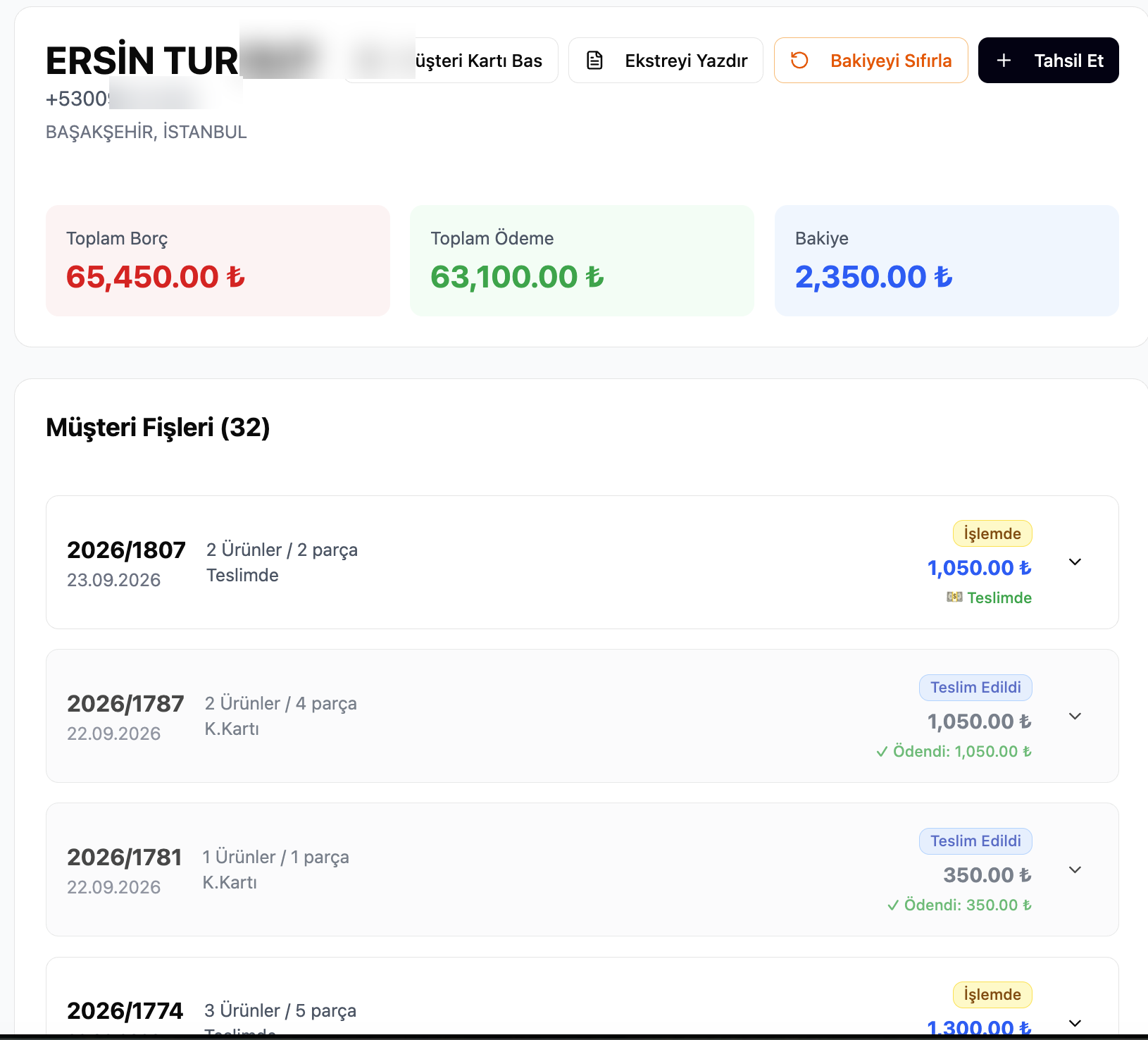
What Appears on the Customer Card?
Each customer's card shows three main figures:
| Field | Description |
|---|---|
| Total Debt | The total of all receipts issued to the customer |
| Total Payment | The total of all collections made |
| Balance | Debt – Payment difference (open amount) |
Under the customer receipts, each order is listed on a separate line: receipt number, date, product and piece count, payment method, status (In Process / Delivered) and amount.
Date-Range Account Statement
If you want to see a customer's movements between "August 1 – September 30":
- Click the Print Statement button on the customer card.
- Select the start and end date.
- The statement is generated.
The first line of the statement is always the opening balance — the open amount belonging to the period before the date range you selected. This way, the customer sees their account together with the accumulated amount up to that date; inconsistent-looking figures starting mid-period do not occur.
```
Opening Balance (before 01.08.2026): 1.200,00 ₺
─────────────────────────────────────────────────
03.08.2026 Receipt 2026/1714 Order 850,00 ₺
05.08.2026 Payment C.Card -850,00 ₺
12.08.2026 Receipt 2026/1731 Order 350,00 ₺
22.08.2026 Receipt 2026/1752 Order 1.050,00 ₺
28.08.2026 Payment Cash -1.050,00 ₺
─────────────────────────────────────────────────
Closing Balance: 1.550,00 ₺
```
Excel Export
You can export the statement to Excel. The exported file includes:
- Each row is a transaction (order or payment)
- Date, receipt number, transaction type, amount columns
- Opening balance at the top
- Closing balance at the bottom
- Customer name and date range in the header row
The customer can import this file into their own accounting software or print it directly.
Send the Account Statement on WhatsApp
You don't have to print the statement. After picking the date range on the customer card, tap Send via WhatsApp and the statement arrives on the customer's phone as a clean message:
Business Name · 📄 Account Statement · 👤 JOHN SMITH · 📅 09/09/2026 - 10/09/2026
09/22/26 2026/1770 — $30.00 · 09/22/26 Payment (Card) — -$30.00 · 10/09/26 2026/2288 — $35.00
Debit: $85.00 · Credit: $50.00 · 💰 Closing Balance: Due $35.00
The feature works the same way for dry cleaners, carpet and upholstery cleaners, tailors, shoe repair shops, car washes and beauty salons. It is especially useful for customers who pay on account or settle at the end of the month — hotels, property managers, restaurants — because it removes "how much do I owe?" calls and speeds up collection.
Why Is It Important?
Regular corporate customers — boutiques, schools, hotels, restaurants — generally request monthly or periodic account statements. In Cleandy, this process is completed in a few clicks; there's no need to prepare a separate spreadsheet or rummage through notebooks.
The balance reset operation is also done from the same screen: after entering a collection, if there is a remaining balance, it can be closed with "Reset Balance."
Frequently Asked Questions
Can the account statement be sent on WhatsApp?Yes. Pick the date range and send it to the customer's WhatsApp number in one tap. The message lists the tickets and payments in the period, total debit and credit, and the closing balance.
Is the account statement available for all customers?Yes. The Print Statement button is available on every registered customer's card page in Cleandy. The account feature works the same way across all sectors (dry cleaning, carpet washing, shoe care, etc.).
How wide can the date range be?The start and end dates can be freely selected — one week, one month, one year, or longer.
How is the opening balance calculated?All receipts and payments prior to the selected date range are calculated; the net difference is added as the opening balance on the first line.
Can I email the statement to the customer?You can download the Excel file and send it to the customer via email or WhatsApp.
If the customer used multiple payment methods, how does the statement look?Each payment is listed on a separate line with its payment method (Cash / Credit Card / Transfer). Total payments can also be viewed separately by payment method.